越来越多Web应用支持Passkey登陆了!
我知道我知道!Passkey用到了WebAuthn API
越来越多的应用都开始支持Passkey,这种不需要输入账号密码、也不用发短信验证码,只需要指纹、面容就可以进行登陆或验证的方式,对于用户来说实在是太方便了!登陆时,甚至连用户名都不用输入!
这篇文章讨论一下这种技术的底层实现,以及典型用法。
Web Authentication API
对于标准细节、协议流程等偏低层的部分,先去找找W3C:
Web Authentication: An API for accessing Public Key Credentials Level 3
对于咱想快速开发应用的,重点关注用法,直接找上MDN,我们着重关注这一部分:
Web Authentication API - Web API | MDN
好嘛,看完也是知道了,Passkey主要用到的是非对称加密算法、客户端部分调用Web Authentication API、目前还处在实验室阶段、仅在支持的安全上下文(HTTPS或localhost)可用...
对应注册和验证(例如登录),主要是两个API:
navigator.credentials.create()
navigator.credentials.get()
接下来结合注册和验证,瞅瞅这俩API咋用。
注册
- 应用向程序请求注册。 不属于该协议标准的内容,浏览器向服务器随便传点啥都行...但至少要表达出注册的意思;
- 服务器发送挑战、用户信息和依赖方信息。简单的说,就是服务器要向客户端返回一堆数据,包含标题提到的这些东西。挑战的本质就是一个服务器上生成的随机且安全的buffer(至少16字节),用户信息主要就是用户名儿,依赖方信息主要就是应用id、应用name、应用origin(其实也可以直接在客户端代码中硬编码);
- 浏览器向认证器调用 authenticatorMakeCredential()。 咱关注这个API:
navigator.credentials.create(); - 认证器创建新的密钥对和证明。 同样是内部操作,这个阶段会让用户确认,比如要求输指纹、面容;
- 认证器将数据返回浏览器。 依旧内部操作;
- 浏览器生成最终的数据,应用程序将响应发送到服务器。前面调用API生成的Promise有数据了,按照官方的话来说叫
PublicKeyCredential,包含全局唯一的证书ID及响应信息。其中需要注意数据里面有一个ArrayBuffer类型,传输给后端得想办法编码;(如果用框架就可以减少这部分的烦恼,原则上框架会帮我们处理的) - 服务器验证数据并完成注册。 服务器检查接收到的挑战与发送时的是否一致、origin是否是期望的、还有“使用对应认证器型号的证书链验证 clientDataHash 的签名和证明”。如果验证成功,就把传过来的公钥、用户及其他信息保存下来。
验证(例如登录)
- 应用程序请求身份验证。 不属于该协议标准内容,依旧按照业务需求传;
- 服务器发送挑战。 如同注册过程的2步骤,发送challenge和一些其他信息;
- 浏览器调用 Authenticator 的 authenticatorGetCredential() 方法。咱关注这个API:
navigator.credentials.get(); - Authenticator 创建断言。 根据Relying Party ID寻找注册过的证书,并且提示用户同意认证,如果都成功了,就会用证书的私钥对clientDataHash、authenticatorData进行签名;
- Authenticator 将数据返回给浏览器。 上一步的操作,返回的内容,再返回给浏览器;
- 浏览器创建最终数据,应用程序将响应发送到服务器。 将API返回的Promise解析为一个包含PublicKeyCredential的PublicKeyCredential.response;
- 服务器验证并完成身份验证。 收到请求后,进行验证。例如用注册时的公钥验证签名、验证挑战是否是期望的、验证Relying Party ID是否是期望的。
差不多就是上面这样...看起来比较简单,但其中注册过程(6)步骤中提到,会有一些ArrayBuffer需要手动进行序列化,再考虑到W3C现有规范已经相当复杂的情况下还在不断扩展,实操起来就比较复杂了。但如果我们如果用上框架,事情就又变得简单了起来~
SimpleWebAuthn
一个以TypeScript为主的库集合,用于简化WebAuthn集成。支持现代浏览器和Node。
我在博客中就是用的这个框架,接下来让我们快速开始。
首先分别在前后端项目中安装该库,前端pnpm add -d @simplewebauthn/browser,后端pnpm add -d @simplewebauthn/server(如果你也是用的Nodejs)。
注册
-
前端向后端发起注册请求。后端主要代码如下
typescriptimport type { GenerateRegistrationOptionsOpts } from '@simplewebauthn/server'; import { generateRegistrationOptions } from '@simplewebauthn/server'; // 需要提前准备 // RpName,例如tonesc.cn // RpID,例如tonesc.cn // Origin,例如https://tonesc.cn async function getRegistrationOptions(user: any) { // 按照协议规定,服务端生成一个随机且安全、至少16字节的buffer const challenge = randomBytes(32).toString('base64'); const opts: GenerateRegistrationOptionsOpts = { rpName: RpName, rpID: RpID, userID: Buffer.from(user.userId), userName: user.username, userDisplayName: user.nickname, challenge, authenticatorSelection: { residentKey: 'required', // 必须是可发现凭证(Passkey) userVerification: 'preferred', }, timeout: 60000,// 根据需要调整超时时间 }; const options = await generateRegistrationOptions(opts); // 这里需要自行实现user和challenge的绑定关系 registrationChallenges.set(user.userId, options.challenge) return options; } -
当前端接收到
getRegistrationOptions方法返回的options后,开始向浏览器进行注册。有了框架的加持,注册过程就很容易了:typescriptimport { startRegistration } from '@simplewebauthn/browser'; const optionsJSON = // ... 第一步返回的options const credential = await startRegistration({{ optionsJSON }}) if (credential === null) { throw new Error();// 认证失败,需要自行进行处理 } -
再把上述
startRegistration操作生成的credential,传递给后端,继续完成注册步骤。后端接收到credential后,需要再进行校验。typescriptimport { verifyRegistrationResponse } from '@simplewebauthn/server'; async function register(userId: string, credential: any) { // 这里根据user获取到getRegistrationOptions阶段存储的options.challenge,依旧自行实现 const expectedChallenge = registrationChallenges.get(userId); // 假设expectedChallenge不为null const verification = await verifyRegistrationResponse({ response: credential, expectedChallenge, expectedOrigin: Origin, expectedRPID: RpID, requireUserVerification: false, }); if(!verification.verified){ // 验证失败,需要进行错误处理 return } // 这里把credential存起来,后面登陆时要用 const { credential } = verification.registrationInfo; // ... }
至此,注册步骤就完成了,接下来是验证部分
验证
-
首先,客户端向后端发起验证请求,后端接收到验证请求后,需要这样做,然后把返回值options响应给前端
typescriptimport { generateAuthenticationOptions } from '@simplewebauthn/server'; // sessionId需要与请求绑定,可以采用cookie存储 async function getAuthenticationOptions(sessionId: string) { // 依旧,生成一个随机且安全、至少16字节的buffer const challenge = randomBytes(32).toString('base64'); const opts: GenerateAuthenticationOptionsOpts = { rpID: RpID, challenge, timeout: 60000,// 自定义超时时间 userVerification: 'preferred', }; const options = await generateAuthenticationOptions(opts); // 把sessionId与options.challenge绑定,依旧自行实现 authenticationChallenges.set(sessionId, options.challenge); return options; } -
前端接收到验证options后,进行签名操作
typescriptimport { startAuthentication } from "@simplewebauthn/browser"; const optionsJSON = // ... 向后端发起验证请求,响应的options const credentialResponse = await startAuthentication({ optionsJSON }); // 浏览器验证并签名后,将结果携带至Passkey登陆接口 api.loginByPasskey(credentialResponse); -
后端收到请求后,进行验证签名
typescriptasync function auth(sessionId: string, credentialResponse: any) { // 获取到上次与sessionId绑定的options.challenge const expectedChallenge = authenticationChallenges.get(sessionId); // ... 假设expectedChallenge不为null // 接下来根据credentialResponse.id在数据库等存储介质中查询匹配的passkey记录,记录应该至少包含注册时的credential信息、用户身份信息 const credentialId = credentialResponse.id; const passkey = await this.passkeyRepo.findOne({ where: { credentialId, verified: true }, relations: ['user'], }); const verification = await verifyAuthenticationResponse({ response: credentialResponse, expectedChallenge, expectedOrigin: Origin, expectedRPID: RpID, credential: { id: passkey.credentialId, publicKey: isoBase64URL.toBuffer(passkey.publicKey), counter: passkey.signCount,// 防止重放攻击和凭证克隆的关键安全机制 }, requireUserVerification: false, }); if (!verification.verified) { throw new Error('认证失败'); } // 到这一步,验证就算通过了! // 检查验证的次数,并及时更新后端中存储的passkey验证次数 const newSignCount = verification.authenticationInfo.newCounter; if (newSignCount !== passkey.signCount) { passkey.signCount = newSignCount; await this.passkeyRepo.save(passkey); } // 最后返回passkey注册时绑定的用户,代表该次passkey验证,验证成功的用户 return passkey.user; // 后续就是常规的验证或登陆业务逻辑了 }
总结
网页的passkey登陆,主要用到了浏览器的Web Authentication API接口,其中会涉及到一部分的ArrayBuffer序列化和反序列化、还有各种条件判断,但有了SimpleWebAuthn这个库之后,开发起来就很容易了。至此,经过一系列的集成,我的博客也就支持Passkey登录了。
接下来实机演示动图(暂时还没剪辑软件,所以用的网页在线版编辑的,分辨率比较低 见谅~):
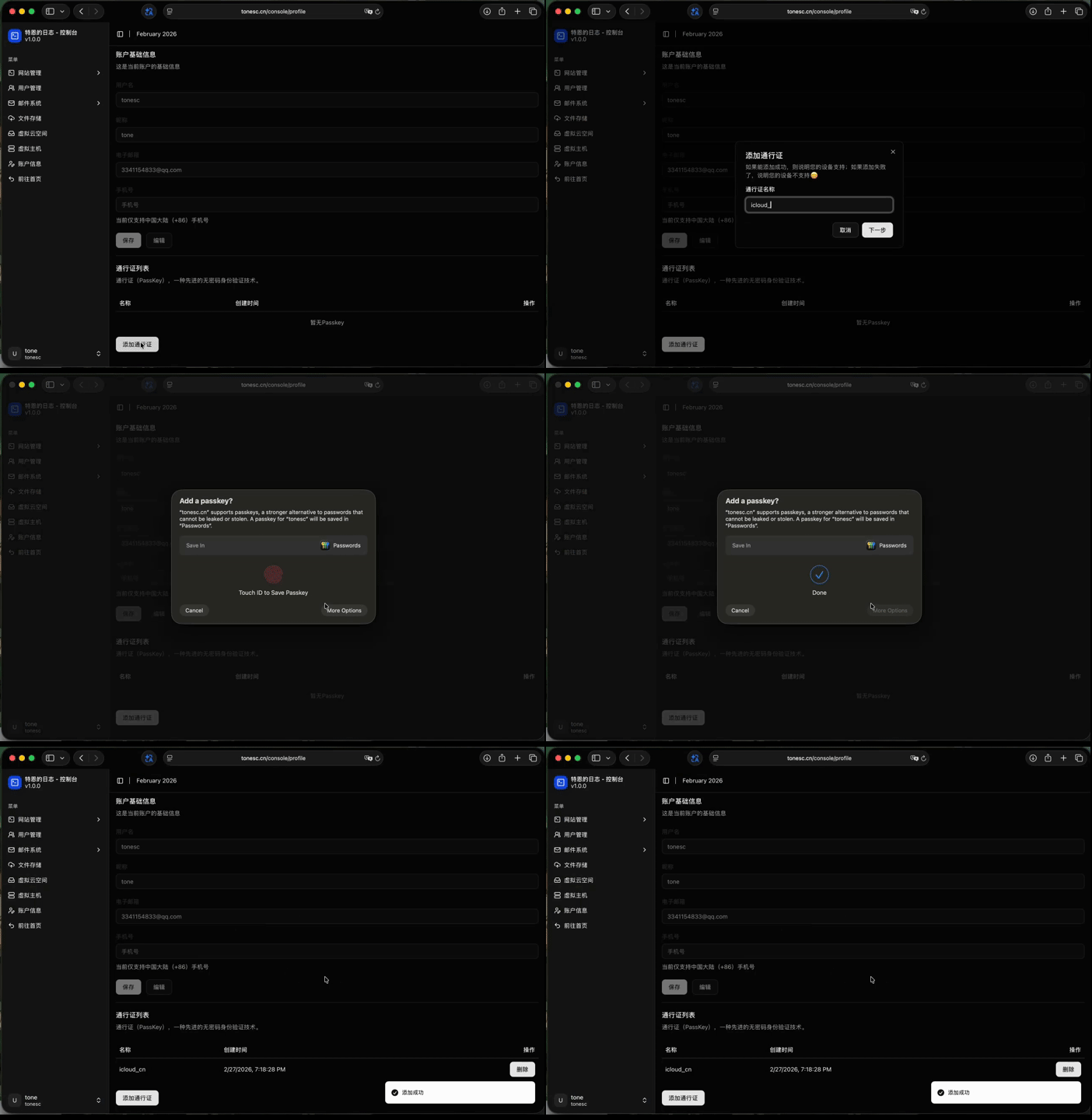 注册
注册
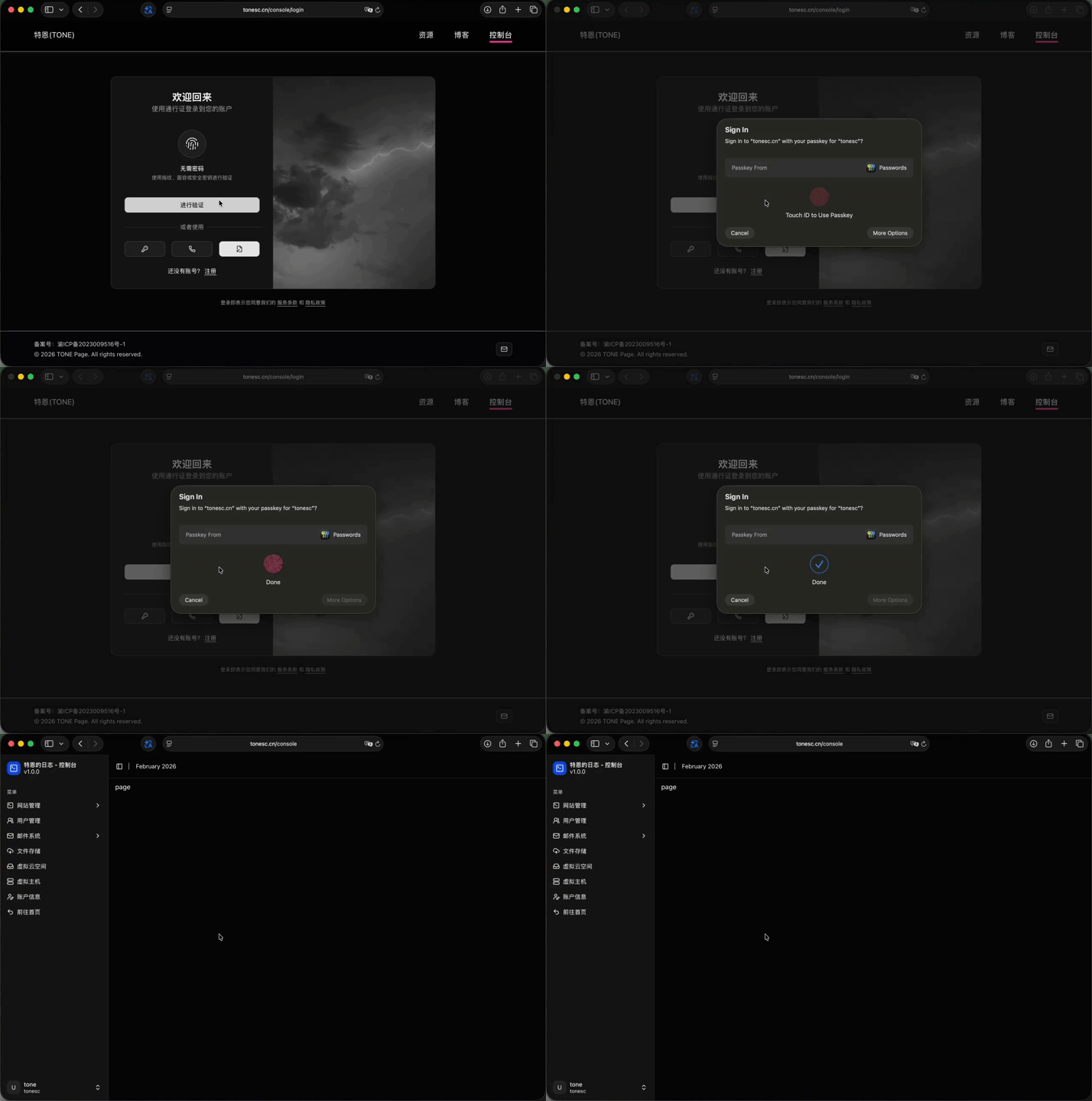 登陆
登陆